
Artificial Intelligence
People Are Using AI To Remove Smart TV Ads: How It Actually Works
Share
TL;DR
-
People are using AI coding agents to customize Android-based smart TV interfaces rather than blocking commercials as they play.
-
Claude Code can help identify unwanted system packages, generate commands, and build simpler home-screen launchers.
-
Android Debug Bridge (ADB) connects a supported TV to a computer, often over Wi-Fi, for approved changes.
-
Open-source projects CleanYourTV, dumbtv, and TV Detox aim to simplify TV home screens and reduce certain tracking features.
-
Compatibility varies, and disabling the wrong component can disrupt important TV functions.
-
Home-screen cleanup does not guarantee ad-free YouTube or streaming; privacy settings and launcher changes may be safer first steps.
Introduction
You've had a long, tiring day at work and all you want to do is sit on the couch, kick back, sip on a nice cold beverage, and watch some lighthearted comedy. You turn on your smart TV, and you're bombarded with the most annoying thing on the planet: advertisements.
This curse has been plaguing television sets since the dawn of modern society.
It's not even subtle now; they blare as soon as you turn on your smart TV. And if you don't want a jump scare from the eardrum-tearing ads, or for them to be the first thing you hear, you've got to have the reaction time of a cat and find a title with a suitable trailer.
Or, you know, mute the TV before you get to what you want.
This gets even worse for the elderly, who just want peace in their house and not have to go to war with their TVs every time they want to watch something. Beyond the added ads and other interruptions, viewers are growing tired of cluttered menus and software that tracks what they watch.
This is why people are using AI to remove smart TV ads, declutter the UI, and make viewing simple.
So, how does it work and how can you enable your smart TV to avoid the ad pandemic? Tune in now.
How Are People Using AI To Remove Smart TV Ads?
To remove smart TV ads with AI (artificial intelligence), people are asking coding agents such as Claude Code to clean up the software that greets them when they switch on their televisions.
This form of vibe coding turns everyday instructions into code, making customizations more approachable without requiring users to write every command themselves.
The motivation goes beyond annoying promotions.
Some TVs use automatic content recognition (ACR) to identify what is playing, sometimes even through connected HDMI devices, depending on settings and consent. This also supports audience measurement or personalized ads.
That helps explain how people use AI to remove smart TV ads while limiting certain tracking features.
How Does AI Actually Remove Ads From Smart TVs?
So, how are people using AI to remove ads from smart TVs?
On compatible Android TV and Google TV devices, they enable Developer options and debugging, connect a laptop on the same network, and authorize an Android Debug Bridge (ADB) connection, often over Wi-Fi.
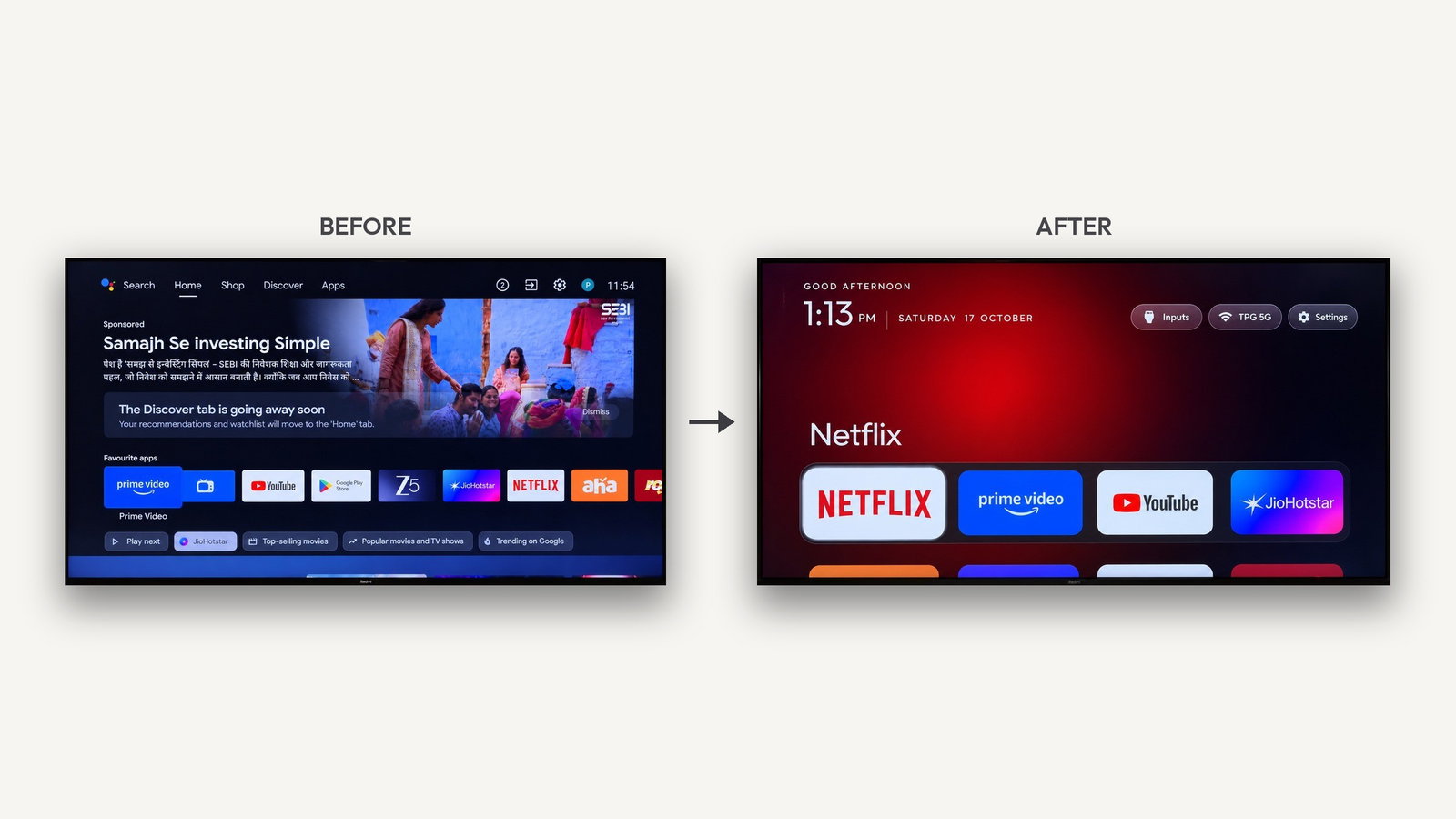
A locally running AI agent helps inspect installed packages, suggests which promotional services might be disabled, produces a model-specific ADB script to strip ads from Google TV's home screen, and disables unwanted services without necessarily deleting them.
After reviewing the proposed commands and recording a way back, the user can run a model-specific ADB script to strip ads from Google TV and install a simpler launcher.
Vibe coding a smart TV launcher can also replace sponsored recommendations with a simple grid of apps. Think of it as a guided software makeover, not a universal AI smart TV ad blocker that skips commercials inside Netflix or YouTube.
Restarting the TV and checking apps, casting, inputs, and remote buttons is essential.
Real Examples Of AI-Powered Smart TV Ad Removal
Developer Gathin T. says he debloated an Android TV by using Claude Code belonging to his parents, disabling 25 preinstalled packages and building a cleaner, Apple TV-style home screen.
"One afternoon I got tired of the ads on my parents' TV, so I had Claude Code clean it up over Wi-Fi and give it a simple home screen with just their apps," Gathin said.
"I put the prompt on GitHub, tweeted the before and after, and people started doing the same to their own TVs: Xiaomi, TCL, Sony, Fire TV, a projector or two. That became cleanyour.tv, a free, open-source way to debloat any Android TV or Google TV."
He later shared the open-source CleanYourTV project, which uses Wi-Fi and offers restoration steps for supported Android/Google TVs. He also launched a website to support him.
Another project, dumbtv, documents cleanup and custom launchers for Fire TV and Android-based platforms. Its developer reports end-to-end testing on a Fire TV Edition set.
Ansub Khan's TV Detox adds another route: Claude Code or Codex guides owners through disabling unwanted apps and installing a minimalist launcher.
These projects are still evolving, and claims of faster interfaces are largely user-reported rather than independently benchmarked.
Can You Safely Remove Smart TV Ads Using AI?
Not without precautions.
AI-generated commands can target the wrong packages, break casting or remote features, or complicate recovery. Network-based ADB access can also expose a TV if debugging is left enabled.
Check your exact model, review every change, keep a recovery plan, and disable debugging afterward. Even an undo function cannot guarantee a smooth recovery. For instance, optional app-removal steps in dumbtv can delete an app instead of simply disabling it, requiring separate reinstallation.
For a lower-risk start, try built-in viewing-privacy settings or supported third-party launchers like Projectivy Launcher, ATV Launcher, or FLauncher. DNS-based filtering may reduce some requests, but it cannot remove every in-app ad.
Check viewing-privacy controls: Samsung labels its opt-in ACR feature Viewing Information Services, while LG users may encounter Live Plus or viewing-information agreements.
Turning ACR off limits certain data collection but cannot eliminate all ads. Android ADB instructions also do not apply directly to Samsung's Tizen, LG's webOS, or Roku.
After all, nobody wants to turn a working TV into an expensive paperweight.
Topics For More Insights
- Top 7 Smart TVs For Gaming At Best Prices
- Meta Muse Code Vs. Claude Code Which AI Coding Agent Wins For Developers
- Top 5 Streaming Services Worth Subscribing To
- Mistral's AI Coding Assistant Is Here! Is This The New Way Of Vibe Coding?
The Final Channel Change
AI is helping frustrated viewers take back control of their smart TVs, one unwanted home-screen panel at a time. CleanYourTV, dumbtv, and TV Detox show what conversational coding can achieve, but they are not one-click fixes for every TV or every advertisement. If a quieter home screen is all you want, start with privacy settings or a supported launcher before giving an AI agent access to your television.
Frequently Asked Questions
Will AI TV Cleanup Tools Work On Samsung, LG, Or Roku TVs?
Not in the same way as on Android TV or Google TV. Samsung generally uses Tizen, LG uses webOS, and Roku devices have their own software platform. The Android Debug Bridge commands used by projects such as CleanYourTV do not directly apply to those systems. Some community experiments exist for other platforms, but device-specific support is uneven. On unsupported sets, explore built-in home-screen options, privacy controls, or network-level ad filtering before attempting unofficial modifications.
Can Removing Smart TV Ads With AI Void The Warranty?
It depends on the manufacturer's terms, the changes performed, and local consumer-protection rules. Disabling preinstalled packages is different from rooting a TV or replacing its firmware, but a support team may still request a factory reset before troubleshooting. More invasive alterations may create additional issues with service coverage. Read the project documentation and the manufacturer's warranty conditions, record your original settings, and avoid claiming that a reversible script is guaranteed risk-free on every TV model.
Does Disabling Automatic Content Recognition Stop All TV Tracking?
No. Automatic content recognition (ACR) is only one way a television can collect viewing-related information. Turning it off, where the TV offers that control, can reduce content identification for advertising or audience measurement. Streaming apps may still collect activity linked to your account, and the operating system can retain diagnostic or usage settings. Check app-level privacy policies, advertising preferences, and permissions separately. Disabling ACR is a useful privacy step, but it is not a universal opt-out.
Thu, Oct 22, 2026

Enjoyed what you've read so far? Great news - there's more to explore!
Stay up to date with the latest news, a vast collection of tech articles including introductory guides, product reviews, trends and more, thought-provoking interviews, hottest AI blogs and entertaining tech memes.
Plus, get access to branded insights such as informative white papers, intriguing case studies, in-depth reports, enlightening videos and exciting events and webinars from industry-leading global brands.
Dive into TechDogs' treasure trove today and Know Your World of technology!
Disclaimer - Reference to any specific product, software or entity does not constitute an endorsement or recommendation by TechDogs nor should any data or content published be relied upon. The views expressed by TechDogs' members and guests are their own and their appearance on our site does not imply an endorsement of them or any entity they represent. Views and opinions expressed by TechDogs' Authors are those of the Authors and do not necessarily reflect the view of TechDogs or any of its officials. While we aim to provide valuable and helpful information, some content on TechDogs' site may not have been thoroughly reviewed for every detail or aspect. We encourage users to verify any information independently where necessary.
Loading comments...