
Cyber Security
9 Cyber Hygiene Best Practices To Follow In 2026
Share
TL;DR
-
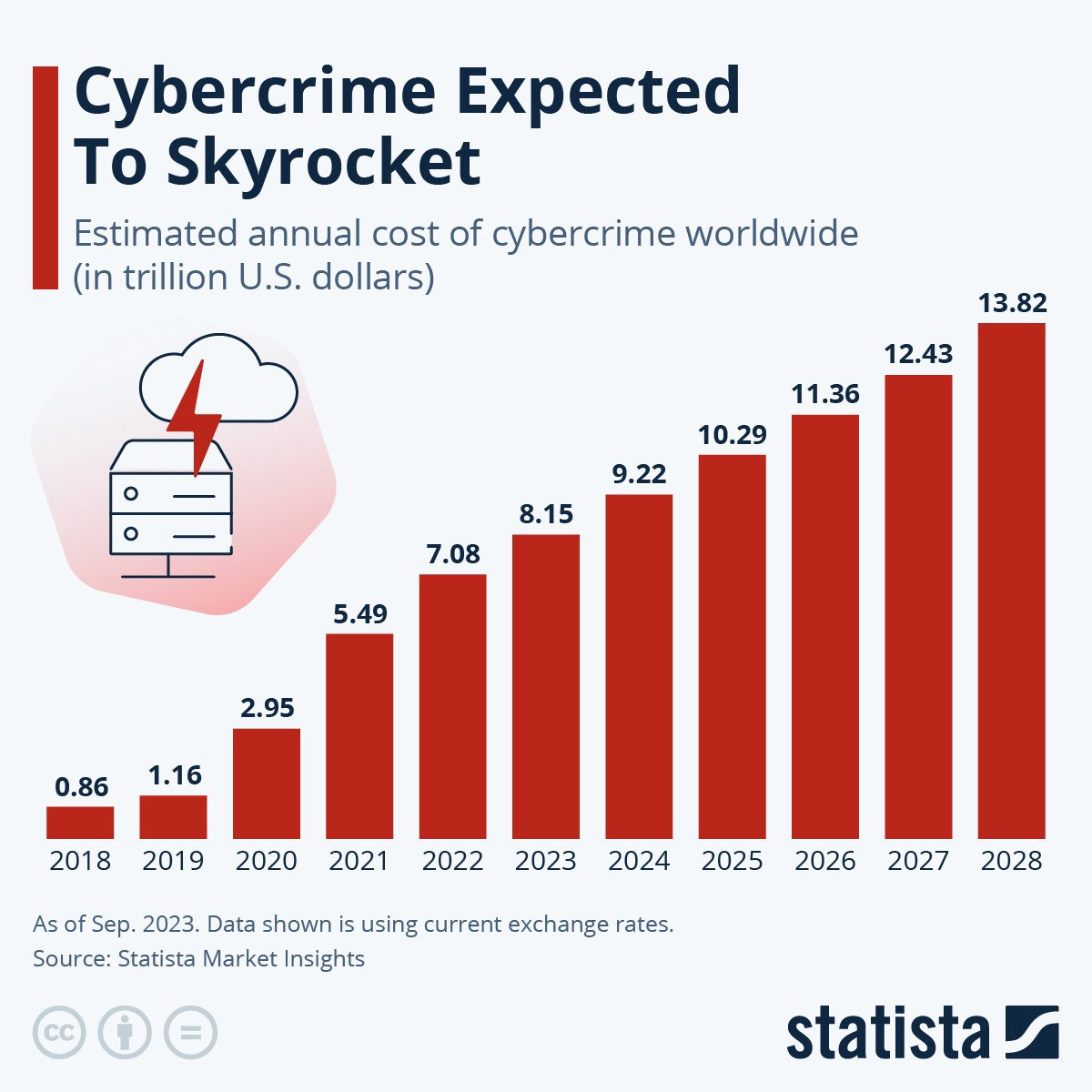
The FBI recorded more than one million internet crime complaints and nearly $21 billion in reported losses during 2025.
-
NIST now prioritizes password length over complicated character-mixing rules.
-
Software updates matter more as vulnerability exploitation accounts for 31% of breaches analyzed by Verizon.
-
Phishing-resistant MFA and passkeys offer stronger protection than passwords and SMS codes alone.
-
Backups, endpoint protection, safer browsing, scam awareness, and employee training remain essential parts of everyday cybersecurity.
Introduction
Remember Dexter from Dexter's Laboratory brushing his teeth with a comb and his hair with a toothbrush because he was barely awake?
Funny? Absolutely. Efficient? Not quite.
The scene also makes a surprisingly useful point about cybersecurity: routines only protect you when you follow the right ones.
That matters even more in 2026. The FBI's latest Internet Crime Complaint Center report recorded 1,008,597 complaints and nearly $21 billion in reported cyber-enabled crime losses during 2025. Meanwhile, Verizon's 2026 Data Breach Investigations Report (DBIR) shows attackers increasingly combining AI, vulnerability exploitation, and social engineering.
Consider these Cyber Hygiene Best Practices your updated digital morning routine.
Practice 1: Understand What Cyber Hygiene Protects
Cyber hygiene means maintaining habits that reduce everyday digital risk, much like personal hygiene reduces exposure to physical threats.
That includes protecting accounts, devices, software, networks, and personal data.
The threat itself has changed since the original version of this article. Verizon's 2026 DBIR found that 31% of breaches now begin with vulnerability exploitation, while generative AI is assisting 15 distinct attack techniques.
For a wider view, TechDogs' Cybersecurity Trends Redefining Enterprise Security In 2026 explores how AI, identity risks, and third-party attacks are changing cybersecurity.
Cyber hygiene is therefore less about one security product and more about eliminating easy openings.
Practice 2: Use Longer Passwords And A Password Manager
Passwords are still the keys to Dexter's lab, but the rules for making a strong key have changed.
The older advice said to mix uppercase letters, lowercase letters, numbers, and symbols. Current NIST password guidance says providers should not impose arbitrary composition rules. Instead, passwords used as the only authentication factor should be at least 15 characters long.
Better habits include:
-
Use long, unique passwords for different accounts.
-
Store them in a reputable password manager.
-
Never reuse compromised passwords.
-
Use passkeys where supported.
-
Long and unique beats Dexter@123! every time.
Practice 3: Keep Software Regularly Updated
That update notification you keep dismissing may be doing more than interrupting your afternoon.
Software updates often close vulnerabilities attackers can exploit. This matters because vulnerability exploitation became the leading initial breach vector in Verizon's 2026 DBIR, accounting for 31% of analyzed breaches.
Enable automatic updates wherever practical for:
-
Operating systems
-
Browsers
-
Mobile devices
-
Applications
-
Routers and connected devices
-
Security software
Updates are no longer just about new features. They shorten the period during which a known flaw remains available to attackers.
Practice 4: Adopt MFA And Prefer Passkeys
Multi-Factor Authentication (MFA) remains one of the strongest everyday defenses, but 2026 calls for a stronger version of it.
Traditional SMS codes can still be phished or intercepted. NIST recommends making phishing-resistant authentication available, while Microsoft now describes phishing-resistant MFA as a new security baseline.
Passkeys go further by using cryptographic credentials tied to the legitimate website or application. Microsoft began making passkeys the default authentication experience for eligible Entra ID users on September 1, 2026.
So, turn on MFA, but choose passkeys or FIDO2 security keys where available.
Practice 5: Keep Backups You Can Actually Restore
Backing up your data is still one of the original article's strongest recommendations.
The familiar 3-2-1 model remains useful:
-
3 copies of important data
-
2 different storage types
-
1 copy stored separately or offsite
CISA's ransomware guidance continues to recommend multiple copies, offline backups, and regular restoration checks.
The last part is easy to overlook. A backup is only useful if you can restore it.
Schedule backups automatically, protect them from unauthorized modification, and occasionally test whether important files can actually be recovered.
Practice 6: Learn To Spot Modern Phishing And AI Scams
This practice replaces the original general "safe browsing" section because phishing now deserves its own space.
Attackers are moving beyond badly written emails. AI can help produce convincing messages, while social engineering increasingly arrives through texts and phone calls.
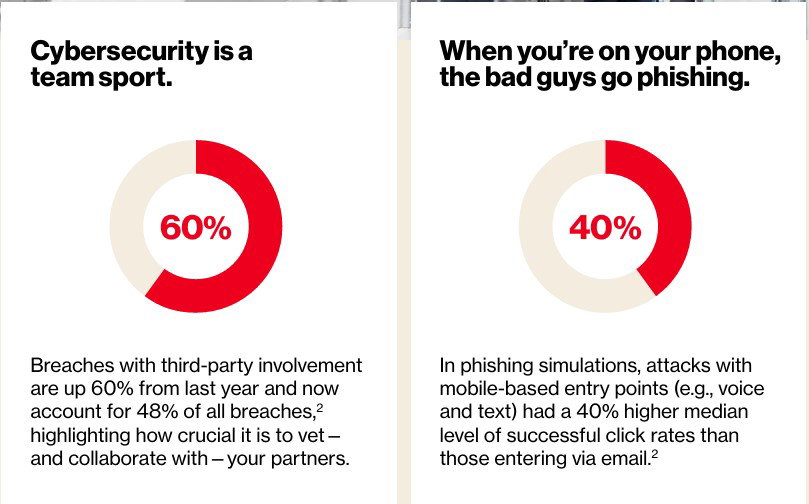
Verizon found that mobile-based phishing simulations produced 40% higher successful interaction rates than traditional email phishing.
Pause when someone unexpectedly asks you to:
-
Share credentials
-
Approve an MFA request
-
Transfer money
-
Install software
-
Open an unfamiliar attachment
-
Move a conversation to another platform
If something feels urgent, verify it through a separate trusted channel.
Practice 7: Use Updated Security And Anti-Malware Protection
Antivirus software is not obsolete, but endpoint security has become broader.
For individuals, the FTC recommends using reputable security software and enabling automatic updates and file scanning.
Businesses may go further with centrally managed antivirus, Endpoint Detection and Response (EDR), application controls, and monitoring. CISA specifically recommends automatic anti-malware updates and properly configured endpoint protections.
Think of it as Dexter's computer watching the lab while Dexter is busy inventing something else.
Practice 8: Use Public Wi-Fi Carefully, Not Fearfully
This section needed one of the biggest corrections.
The older advice treated public Wi-Fi itself as inherently unsafe. The FTC now explains that because most websites use HTTPS encryption, using public Wi-Fi is usually safe.
Still, practice basic caution:
-
Confirm the correct network name.
-
Keep your device and browser updated.
-
Avoid automatically joining unfamiliar networks.
-
Look for HTTPS.
-
Use your organization's VPN when policy requires it.
-
Never ignore browser certificate warnings.
A VPN can provide additional privacy but it does not magically make a fake website trustworthy.
Practice 9: Train Employees For Today's Threats
The old "95% of breaches are caused by human error" statistic should go.
The better lesson from current evidence is that people remain part of the attack surface but the tactics targeting them are changing.
Verizon's 2026 research shows attackers increasingly using mobile pretexting, fake calls, texts, and AI-assisted techniques. It also found frequent employee use of unapproved "shadow AI" tools rose from 15% to 45%, creating another potential route for data leakage.
Employee training should therefore cover more than phishing emails. Teach people how to handle:
-
Suspicious calls and texts
-
MFA fatigue attacks
-
Help-desk impersonation
-
Sensitive data entered into AI tools
-
Unexpected software downloads
-
Escalation and incident reporting
Training works best when employees know what action to take, not just what threat to fear.
Wrapping It Up!
Dexter never stopped inventing because one experiment went wrong. He adjusted the process and tried again.
Cyber hygiene works the same way.
Some fundamentals from 2025 remain exactly where they belong: update software, back up data, protect accounts, use security tools, and educate people. What has changed is how those habits should be practiced. Password guidance has evolved, passkeys are gaining ground, AI is reshaping scams, and even the old warnings around public Wi-Fi need more nuance.
As Verizon's Daniel Lawson put it, "the foundational principles of security and strong risk management remain the most effective defense."
Good cyber hygiene in 2026 is not about paranoia. It is about making safe behavior routine enough that you do not have to think twice.
Frequently Asked Questions
Are Passkeys Safer Than Passwords?
Yes. Passkeys use public-key cryptography and are tied to the legitimate website or application, making them resistant to common phishing attacks. Microsoft describes FIDO2 passkeys as a significant security upgrade over phishable authentication methods.
Should I Change My Password Every Few Months?
Not automatically. Current NIST guidance says users should not be forced to change passwords periodically unless there is evidence that the credential has been compromised.
Is A VPN Necessary Every Time I Use Public Wi-Fi?
Not necessarily. Most modern websites encrypt traffic using HTTPS, so the FTC says public Wi-Fi is usually safe. A VPN can still be useful for organizational requirements or additional privacy but it does not replace safe browsing practices.
Mon, Dec 30, 2024

Enjoyed what you've read so far? Great news - there's more to explore!
Stay up to date with the latest news, a vast collection of tech articles including introductory guides, product reviews, trends and more, thought-provoking interviews, hottest AI blogs and entertaining tech memes.
Plus, get access to branded insights such as informative white papers, intriguing case studies, in-depth reports, enlightening videos and exciting events and webinars from industry-leading global brands.
Dive into TechDogs' treasure trove today and Know Your World of technology!
Disclaimer - Reference to any specific product, software or entity does not constitute an endorsement or recommendation by TechDogs nor should any data or content published be relied upon. The views expressed by TechDogs' members and guests are their own and their appearance on our site does not imply an endorsement of them or any entity they represent. Views and opinions expressed by TechDogs' Authors are those of the Authors and do not necessarily reflect the view of TechDogs or any of its officials. While we aim to provide valuable and helpful information, some content on TechDogs' site may not have been thoroughly reviewed for every detail or aspect. We encourage users to verify any information independently where necessary.
Loading comments...